A complete analysis
This tutorial clusters MDANCE’s own example from start to end, in the window and in a script. It also reads what each step says.
The trajectory is the tau peptide that MDANCE’s Python package ships: 6001
frames of a flexible twelve-residue peptide, its ends capped. Every number
here was made with the vmdance command, and
docs/tools/tutorial_numbers.tcl makes them again. Yours will be the
same with the same backend.
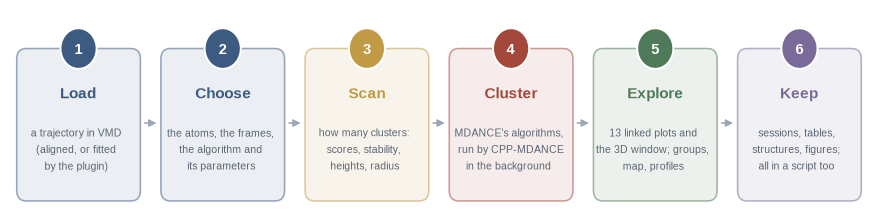
You need:
a VMD built with Tcl/Tk 8.6 (VMD 2; tested in 2.1);
VMDance and CPP-MDANCE (Install);
the data:
pip install mdance, then the filesaligned_tau.pdbandaligned_original_tau_6K.dcdof the package’smdance/datafolder.python -c "import mdance, os; print(os.path.dirname(mdance.__file__))"says where it is.
1. Load the trajectory
In VMD, use File ▸ New Molecule: load the PDB, then the DCD into the same molecule.
The PDB brings a frame of its own, which is not part of the trajectory MDANCE clusters. Delete it, in the Main window’s frame list or with the command below. The molecule then has 6001 frames (6002 with it; Setup’s frame count says which).
The frames are already superposed on the peptide’s backbone, so no fit is needed. Setup says so itself (step 2).
set m [mol new aligned_tau.pdb]
mol addfile aligned_original_tau_6K.dcd waitfor all
animate delete beg 0 end 0 $m      ;# the PDB's own frame: 6001 left
Open Analysis ▸ VMDance. VMD 2’s main window has no Extensions menu. In VMD 1.9, it is Extensions ▸ Analysis ▸ VMDance.
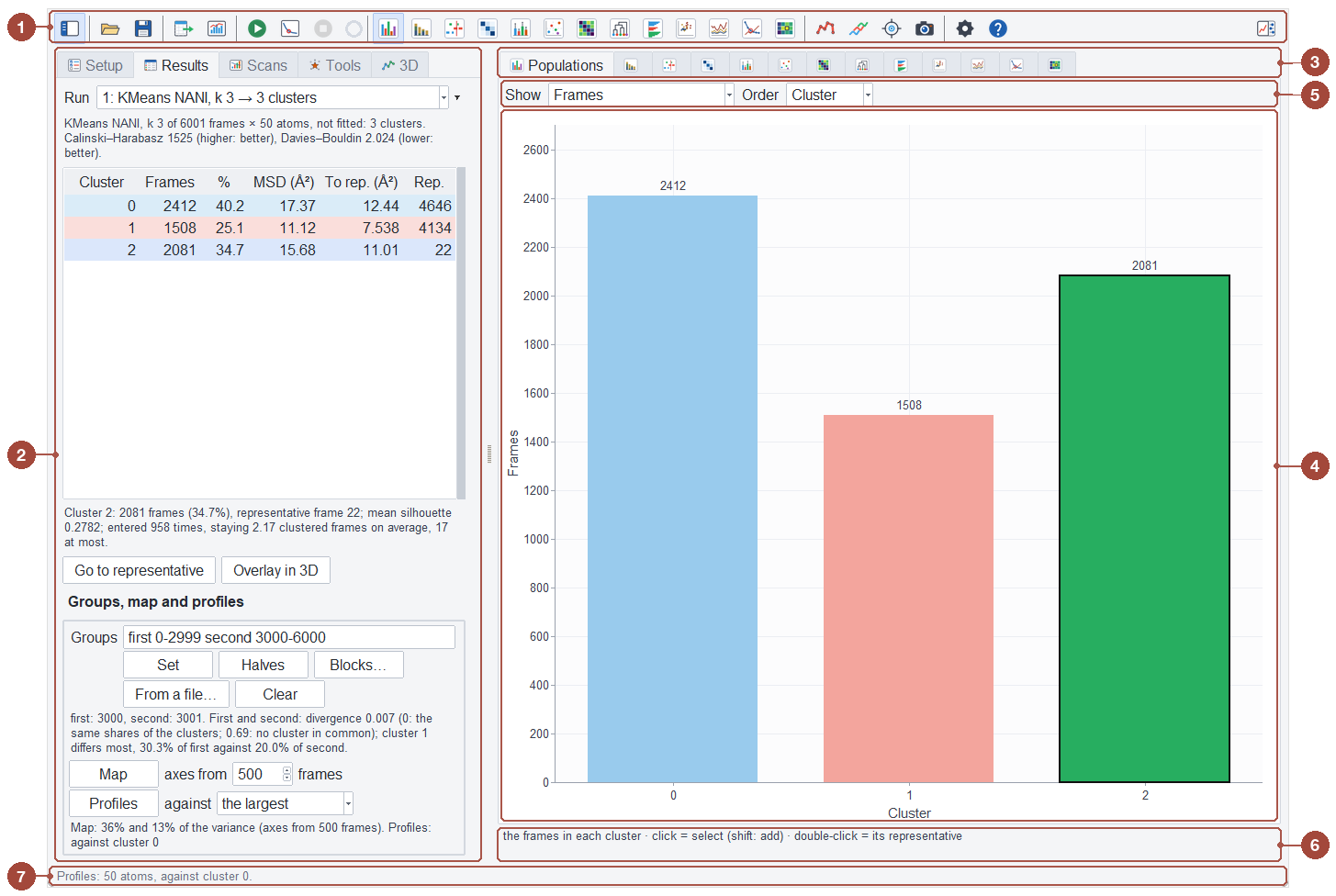
The window: (1) the toolbar; (2) the panes — Setup, Results, Scans, Tools, 3D; (3) the plots’ tabs; (4) the plot; (5) its options; (6) what the pointer is on; (7) the status line.
2. Choose what to cluster
In Setup ▸ What to cluster, choose:
the molecule;
the atoms
resid 3 to 12 and name CA N C O H: 50 atoms, the backbone of residues 3 to 12 and its amide hydrogens (those MDANCE’s own tutorial clusters);every frame (6001).
The atoms decide what “alike” means. The backbone compares the peptide’s folds. Its side chains are left out, and so are the two flexible ends.
Fit to the first frame stays off, and the note under it says why it can: Not fitted. From the first frame: 3.71 Å as they are, 3.3 Å fitted: the frames look superposed. A trajectory that was not aligned is far from its first frame as it is, and near it once fitted. The note then turns red-brown and says to tick Fit.
The algorithm is KMeans NANI, with Seeding set to Complementary
similarity (CompSim). With it, the seeds come from the densest
frames. The default is Stratified, all frames.
These four choices shape every number that follows: the atoms, the superposition, the frames and the algorithm (The algorithms).
3. How many clusters?
Open Scans ▸ Elbow. Set k from 2 to 12, tick Stability, and press Scan (a minute or two). The scan makes the same clustering at every k. It makes it again from NANI’s four seedings that draw no random number, to see whether the clusters depend on the seeding.
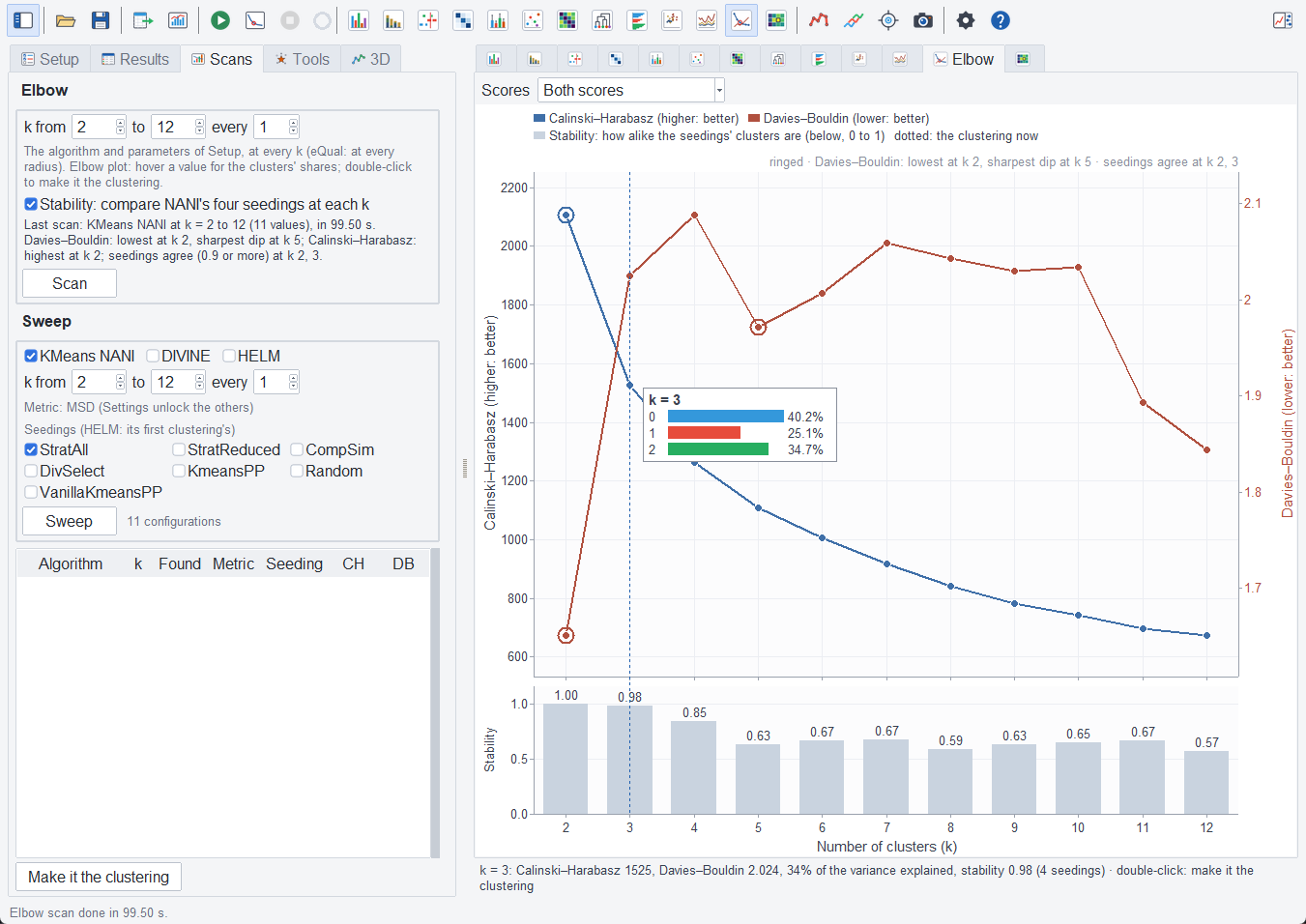
Calinski–Harabasz (blue), Davies–Bouldin (red) and the stability (bars) at every k. The panel gives k 3’s clusters’ shares.
k |
Calinski–Harabasz (higher: better) |
Davies–Bouldin (lower: better) |
Variance explained |
Stability (1: the same clusters) |
|---|---|---|---|---|
2 |
2109 |
1.65 |
26% |
1.00 |
3 |
1525 |
2.02 |
34% |
0.98 |
4 |
1263 |
2.09 |
39% |
0.85 |
5 |
1109 |
1.97 |
43% |
0.63 |
6 |
1006 |
2.01 |
46% |
0.67 |
7 |
916 |
2.06 |
48% |
0.67 |
8 |
840 |
2.04 |
50% |
0.59 |
9 |
781 |
2.03 |
51% |
0.63 |
10 |
744 |
2.03 |
53% |
0.65 |
11 |
695 |
1.89 |
54% |
0.67 |
12 |
675 |
1.84 |
55% |
0.57 |
The Elbow plot rings the values the scores point to. The Scans box (and
vmdance elbow suggest) says them in words: Davies–Bouldin: lowest
at k 2, sharpest dip at k 5; Calinski–Harabasz: highest at k 2; seedings
agree (0.9 or more) at k 2, 3. The line above the plot says the same,
shorter.
These are three readings, and they do not agree:
The scores are best at k 2. Davies–Bouldin is lowest there (1.65) and Calinski–Harabasz highest. Calinski–Harabasz falls at every k, as it does on structures that form no well-separated states. Two clusters are the best-separated partition, and a coarse one.
Davies–Bouldin dips most sharply at k 5: 1.97, between 2.09 at k 4 and 2.01 at k 6. This is MDANCE’s second criterion, the largest second derivative of Davies–Bouldin. Its first is the lowest value. MDANCE’s own tutorial goes on with k 6, next to it. The dip says where the score bends: five clusters are better separated than four or six.
The seedings agree only at k 2 and 3 (stability 1.00 and 0.98). At k 4 it is 0.85, and from k 5 between 0.57 and 0.67. There the clusters change with the seeding.
Neither reading is wrong: they answer different questions. k 5 is where the score bends. Only up to k 3 are the clusters the same whatever the seeding. At k 5 or 6, another seeding gives other clusters.
The variance the clusters explain (Scores ▸ Variance explained) settles nothing here. It rises ever more slowly, from 26% at k 2 to 55% at k 12, with no sharp bend.
This tutorial goes on with k 3, for that reason. What it reads off the clusters below, their populations and their make-up by half, should not depend on how k-means was started.
To follow MDANCE’s tutorial, or for a finer partition, take k 6
(vmdance elbow load 6: 699, 1093, 1223, 1292, 721 and 973 frames). Say
with it that its clusters depend on the seeding.
4. Cluster
Double-click k 3 in the Elbow plot (or vmdance elbow load 3). It is
made the clustering, a run of its own in Results.
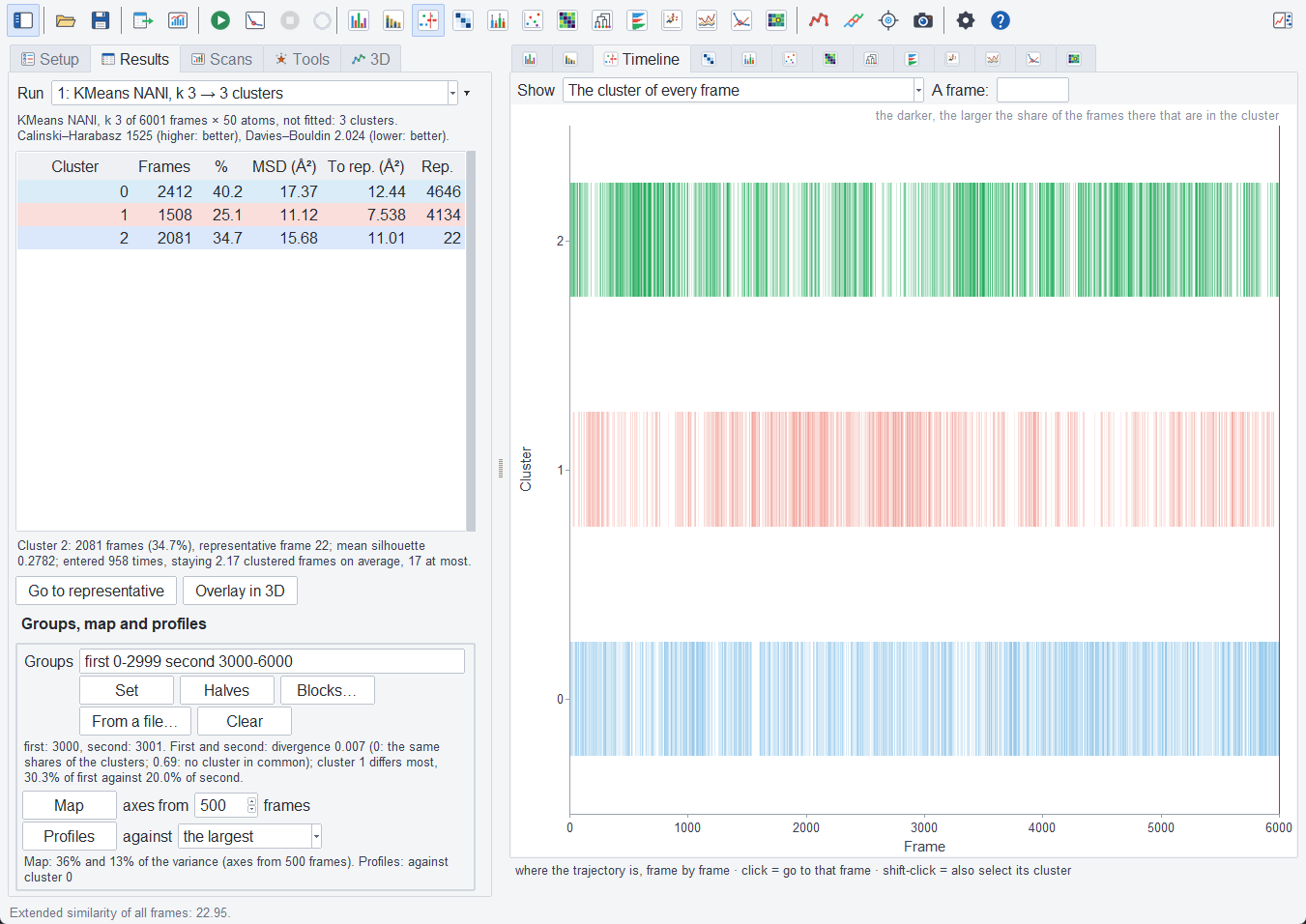
The clusters, and the Timeline: the cluster of every frame.
The clusters hold 2412, 1508 and 2081 frames (40%, 25% and 35%).
The mean silhouette is 0.25. The clusters are loose: their frames are not much closer to their own cluster than to the next. That is the silhouette from the clusters’ mean structures, which is never below zero for k-means. From every frame (the Silhouette’s option From: Every frame), the mean is 0.27, and 586 frames (10%) are below zero. These frames are nearer another cluster’s frames than their own’s.
The trajectory stays about two frames in a cluster before it moves on (Residence: 2.19, 1.91 and 2.17 frames on average, 22, 12 and 17 at most). The 6001 frames are far apart in time, and the peptide changes between any two.
The Timeline shows it. With more frames than pixels, its lanes are shaded by each cluster’s share of the frames there. Its view Each cluster’s share so far draws the populations settling: every cluster has been seen by frame 30.
Click a cluster in the table: it is drawn on top in every plot.
Double-click it: VMD goes to its representative frame.
3D ▸ Colour by cluster colours the structure by the current frame’s cluster as the trajectory plays.
Representatives draws them all at once.
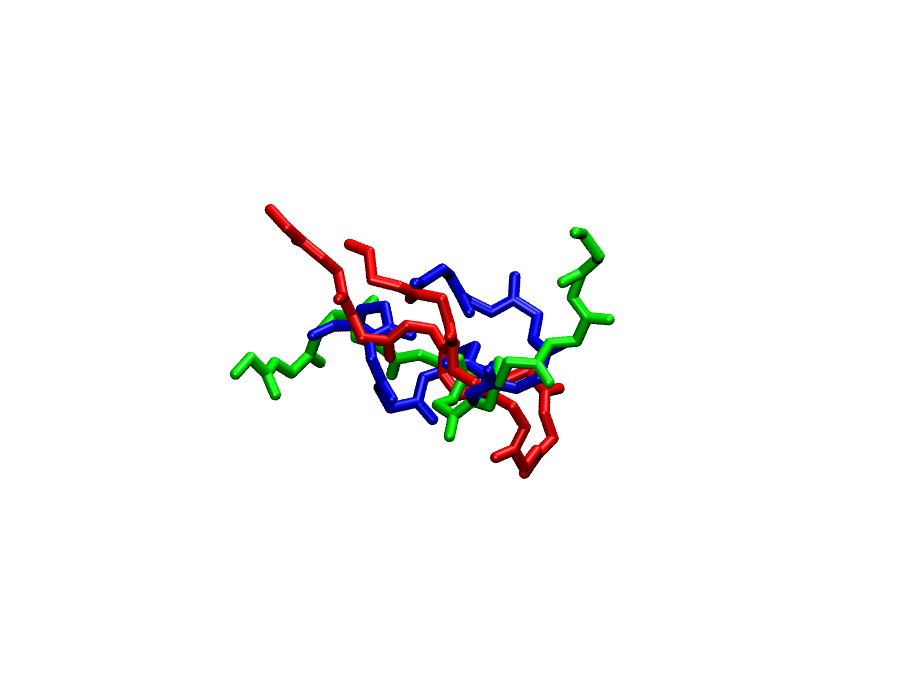
The representatives, each in its cluster’s colour.
5. A second opinion
Two other algorithms answer “how many” their own way.
HELM merges 60 small clusters two by two, down to 3. In Setup ▸ HELM, set Clusters (k) to 3 and Start from to 60, then press Cluster. The Tree plot’s merges’ heights draws how far apart the clusters each merge joins. A merge far above the one before marks a natural k.
Here the heights climb gently. The last eight merges, from 11 clusters down to 3, are all between 13.6 and 16.4 Ų. The plot says so: no merge stands out from the one before it. The largest step, 1.6 times the merge before, is from 57 clusters to 56. It is among the first, finest merges: it says nothing of a small k, and is not marked.
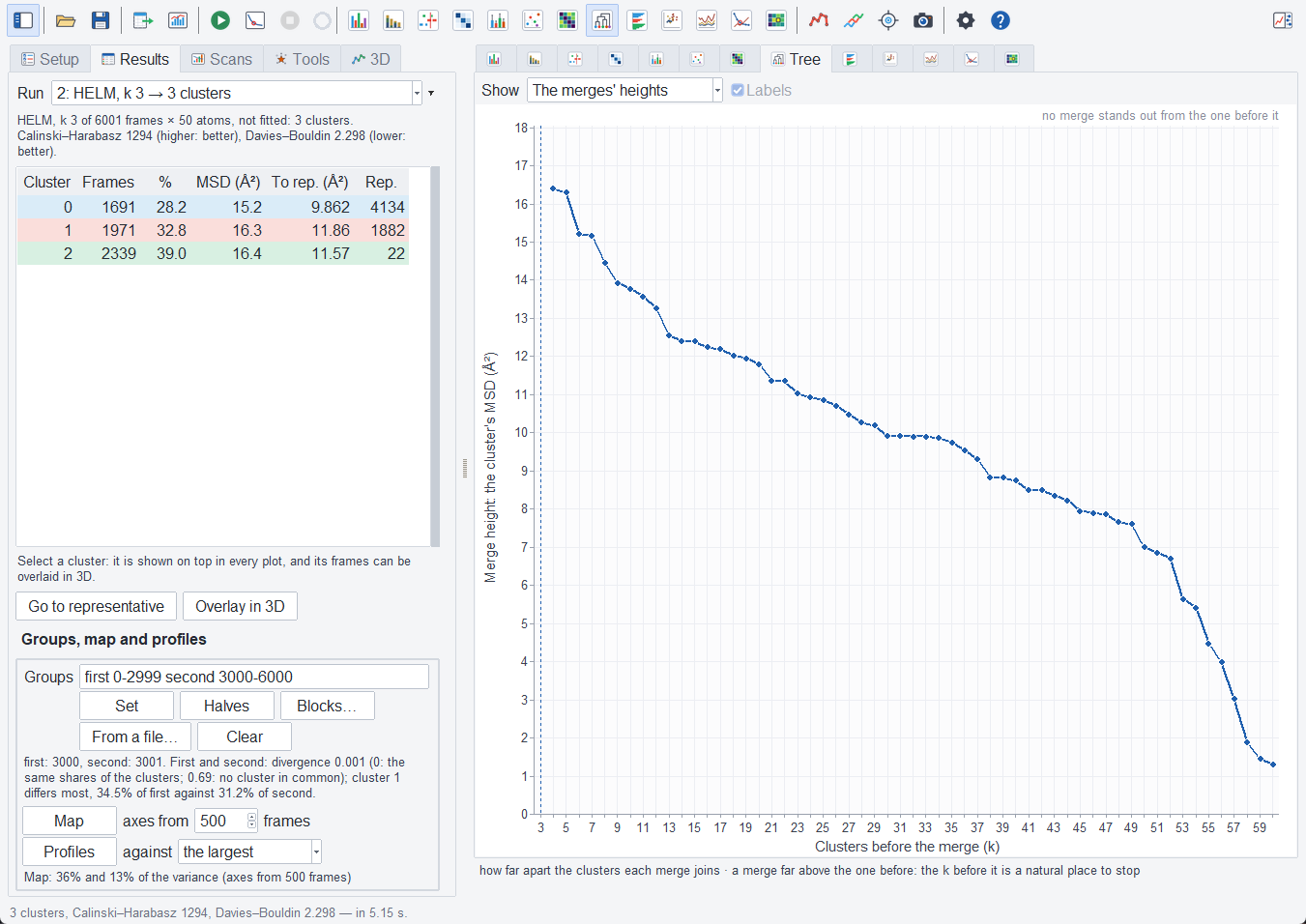
HELM’s merges’ heights: no jump at a small k.
eQual finds as many clusters as a radius makes. Choose eQual in Setup, then open Scans ▸ Elbow: the box then asks for radii. Suggest proposes a range from the frames themselves: 3.4 to 10 every 0.73 here, from the distances between 147 of them.
Scanned at 4 to 12 every 2 (typed in the box, then Scan), eQual makes 194 clusters at a radius of 4 Ų, 55 at 6, 19 at 8, 9 at 10 and 7 at 12. There is no plateau, where several radii would give the same clusters. The radius is MDANCE’s MSD: 8 Ų is an RMSD of 4 Å to the seed, √(2 × 8).
All three say the same: the peptide’s conformations form a continuum, not a few well-separated states. k 3 is a stable, useful partition of it: the three broad shapes the peptide takes. It is not three states with barriers between them. Say so when you report it.
6. Compare groups: has the run converged?
First choose the k 3 clustering again in Results ▸ Run: HELM’s is the
current run now. Then, in Results ▸ Groups, press Halves, or type
first 0-2999 second 3000-6000 and Set. The two halves of the
trajectory are now groups. The Make-up plot shows each cluster by
half.
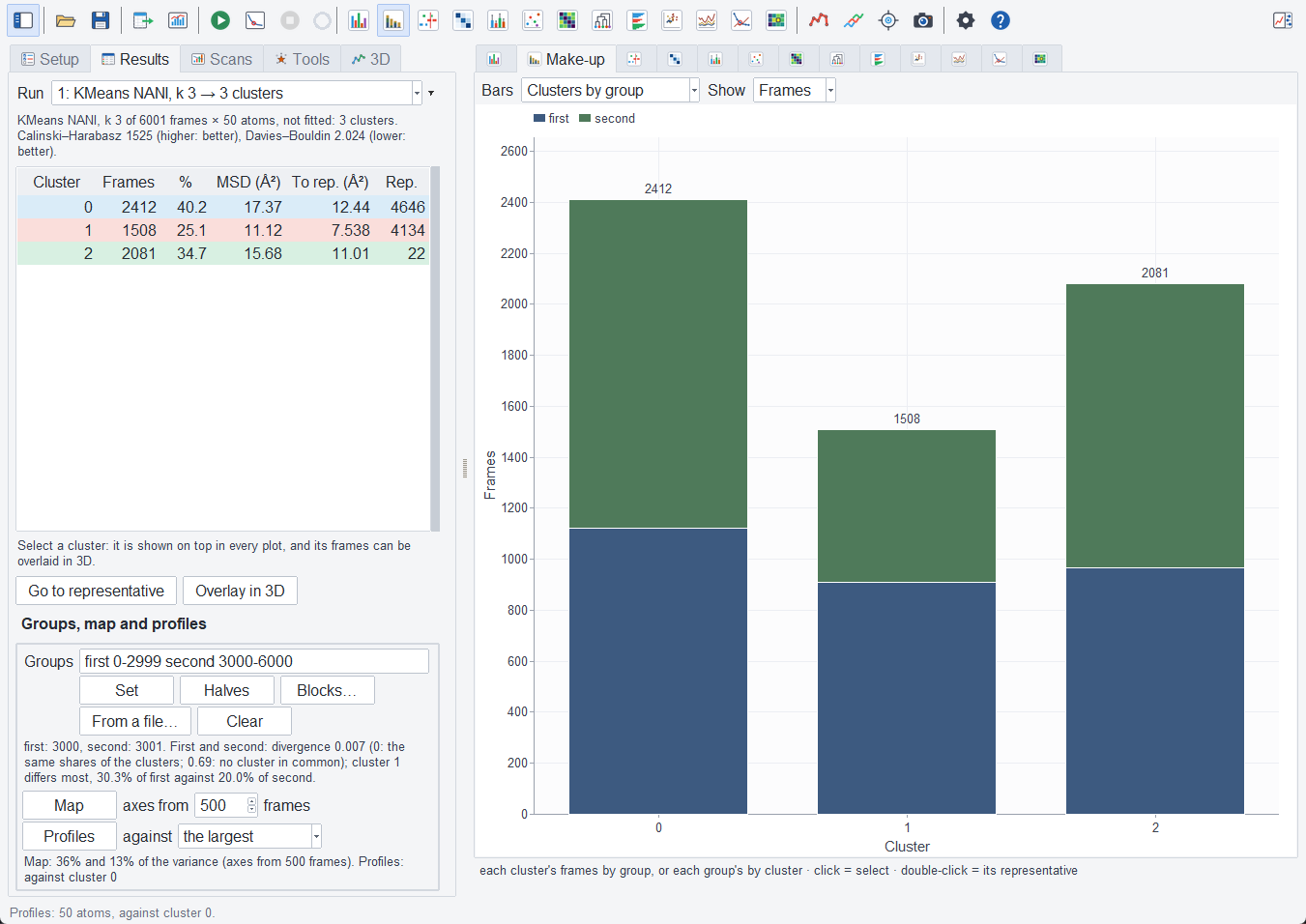
Each cluster by the half of the trajectory its frames came from.
Both halves visit all three clusters: no state is missing from either. But they do not visit them equally. Cluster 1 holds 909 frames of the first half and 599 of the second.
The line under the Groups box says it in a number: First and second: divergence 0.007 (0: the same shares of the clusters; 0.69: no cluster in common); cluster 1 differs most, 30.3% of first against 20.0% of second.
The halves are alike, not the same. The populations have not settled to better than ten points of a share. A longer run, or more replicas, would change them.
Two more plots look at the groups (Comparing groups of frames):
Map places every frame on the first two principal components (36% and 13% of the variance), coloured by half, with each cluster’s representative ringed.
Profiles says, residue by residue, where the clusters differ from the most populated one.
7. Keep it
File ▸ Save session keeps every run, the last elbow scan and the last sweep, the groups, the map and the profiles. The last elbow scan is eQual’s radii here: step 5 replaced the scan by k.
File ▸ Export results writes the tables and the structures. Each table has a header saying how it was made.
File ▸ Create figures writes the plots as PDF, PNG or EPS, at the size and text size of a paper’s column or a slide (Files).
The same in a script
Every step above is a vmdance command. The script below runs in VMD’s
console or in text-mode VMD (vmd -dispdev text -e tau.tcl), but for
its last line: figures need VMD’s window (vmd -e tau.tcl). It keeps
the work before the second opinion, whose eQual scan would replace the
scan by k:
package require vmdance
set m [mol new aligned_tau.pdb]
mol addfile aligned_original_tau_6K.dcd waitfor all
animate delete beg 0 end 0 $m           ;# 6001 frames
set sel "resid 3 to 12 and name CA N C O H"
vmdance alignment -mol $m -sel $sel      ;# as_is 3.711 fitted 3.304 … superposed 1
# how many clusters: the scores and the stability at k 2 to 12
vmdance elbow -mol $m -sel $sel -kinit CompSim -from 2 -to 12 -stability 1
vmdance elbow suggest                    ;# db_lowest 2 … db_dip 5 … ch_highest 2 … stable {2 3} …
vmdance elbow load 3                     ;# k 3: the clustering
vmdance clusters                         ;# the table
vmdance silhouette                       ;# mean 0.25 (from the clusters' mean structures)
vmdance silhouette -kind pairs           ;# mean 0.27 (from every frame)
# the two halves as groups
vmdance groups -blocks 2                 ;# first 0-2999, second 3000-6000
vmdance makeup                           ;# 0 {1123 1289} 1 {909 599} 2 {968 1113}
vmdance groups compare                   ;# pairs {{first second 0.007143 0.1034 1}} words {…}
vmdance map
vmdance profiles
# keep it
vmdance session save tau.vmdance
vmdance export results -prefix tau
# a second opinion: HELM's merges' heights, eQual's radius
vmdance -mol $m -sel $sel -algorithm helm -k 3 -initial 60
dict get [vmdance tree] heights
vmdance radii -mol $m -sel $sel          ;# … from 3.4 to 10 by 0.73
vmdance elbow -mol $m -sel $sel -algorithm equal -radii {4 6 8 10 12}
# figures of the k 3 run (VMD's window needed; the elbow is eQual's now)
vmdance run 1
vmdance figures figures -plots {populations makeup map} -formats {pdf png} -size column
What to report
Whoever reads your clustering needs:
the atoms and the superposition (fitted, and on what, or not);
the frames (all, a range, every n-th) and their time apart;
the algorithm, its parameters and the backend (CPP-MDANCE’s version);
how k was chosen (which reading of the scores, the stability, a second algorithm’s view);
the clusters’ sizes and silhouette, and which silhouette;
when there are groups, each cluster’s make-up.
The tables the plugin exports carry most of it in their headers.